> For the complete documentation index, see [llms.txt](https://docs.cartographer3d.com/llms.txt). Markdown versions of documentation pages are available by appending `.md` to page URLs; this page is available as [Markdown](https://docs.cartographer3d.com/original-plugin/firmware-archive/manual-methods/archive/update-via-stlink.md).
# Update via STLink
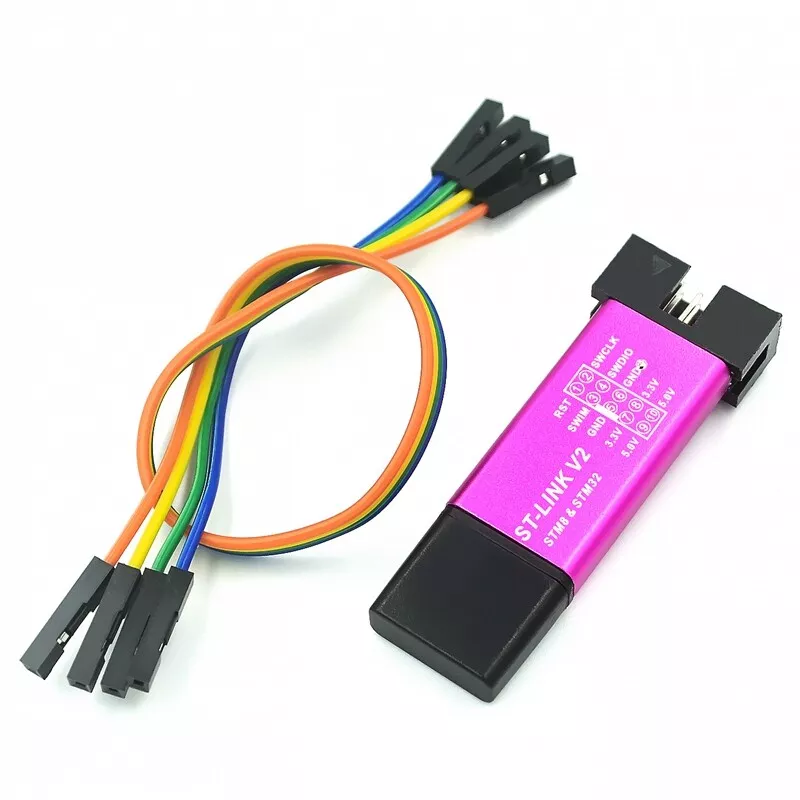
Flashing via a STLink is super simple, and requires a STLink v2 (or similar). Unfortunatly you cannot use a standard TTL-USB adaptor.
This method only works on V2 and V3 probes with the STLink connection points next to the USB Port.
{% hint style="info" %}
I have only personally tested this on a ST-LINK/V2 Mini with modern firmware on it - some older V2's will not work with STM32CubeProgrammer.
{% endhint %}
### Step 1 - Wiring
Wiring is super simple (diagram will be added soon), connect the following to each other
| ST-LINK/V2 | Cartographer v2 / v3 | Notes |
| ---------- | -------------------- | ---------------------------------------------------------------------------------------------- |
| 3.3v | 5v | 5v-5v will work, but seems less reliable, could have been my ST-LINK, but 3.3v works perfectly |
| GND | GND | |
| SWDIO | SWD | |
| SWCLK | SCL | |
### Flashing via STM32CubeProgrammer (Windows & MacOS)
Download and Install STM32CubeProgrammer from [here](https://www.st.com/en/development-tools/stm32cubeprog.html), I warn you it requires you to sign up for an account.
{% hint style="warning" %}
Version 2.14.0 is recommended due to a known bug in 2.16.0 which causes issues when flashing via STMCubeProgammer - this can be selected from the version 'drop down' on the site.
{% endhint %}
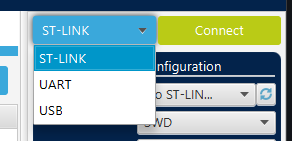
Open the STMCubeProgrammer, and on the RIGHT side, select select STLink from the drop down menu and press **Connect**.
Once you have connected, Click Open File - you will need to select both the Katapult Bootloader for your board, and your Cartographer Firmware that you have downloaded.
Firmwares Loaded (Note same screenshots used for USB version, yours will say STLink on ther right)
For your Cartographer Firmware, you need to set the address to `0x08002000` This provides the 8KiB offset for the firmware. Katapult firmware can be flashed at the default `0x08000000.`
How to change the address in STM32CubeProgrammer (Note same screenshots used for USB version, yours will say STLink on ther right)
If in doubt about what address to use, please check the relevent tables [here](https://docs.cartographer3d.com/firmware-update)
On each of the firmware's press "Download", starting with Katapult, then with Cartographer.\
\
Now press Disconnect in the TOP RIGHT corner.
If your BLUE LED is Flashing, you have not fully flashed your Firmware, and you should start again, If you now Power Cycle your probe, or simply hit the RESET (2) pads from earlier, your probe should react when it has anything solid metal put under it.
---
# Agent Instructions
This documentation is published with GitBook. GitBook is the documentation platform designed so that both humans and AI agents can read, navigate, and reason over technical content effectively. Learn more at gitbook.com.
## Querying This Documentation
If you need additional information that is not directly available in this page, you can query the documentation by asking a question.
Perform an HTTP GET request on the following URL with the `ask` and `goal` query parameters:
```
GET https://docs.cartographer3d.com/original-plugin/firmware-archive/manual-methods/archive/update-via-stlink.md?ask=&goal=
```
`ask` is the immediate question: it should be specific, self-contained, and written in natural language.
`goal` is what the user is ultimately trying to achieve, the reason they need the answer. Sharing it helps GitBook give you a better, more relevant answer. A goal is most helpful when it describes the outcome the user wants rather than restating the question. For example, with `ask=how do I create an API token`, a goal like `automate deployments from our CI pipeline` lets GitBook tailor the answer to that use case.
The response will contain a direct answer to the question and relevant excerpts and sources from the documentation.
Use this mechanism when the answer is not explicitly present in the current page, you need clarification or additional context, or you want to retrieve related documentation sections.