

Which version do I have?
Cartographer has been through four hardware revisions and three generations of Klipper plugin. Most confusion with these docs comes from following a page written for a different combination. Spend two minutes here first.
Hardware version
Section titled “Hardware version”| Version | MCU | How to recognise it | Where documented |
|---|---|---|---|
| V4 | STM32G431 | A single PCB with the coil on the same board as the MCU. Uses a Molex Sherlock connector for USB or CAN. Ships with USB firmware. | All current pages |
| V3 | STM32F042 | Two boards: a coil board soldered to an MCU board with pin headers. Available in Standard, Low Profile and Right Angle assemblies. USB or CAN. | All current pages |
| V2 | STM32F042 | Same MCU as V3 and uses the same firmware files (the v2-v3 folder). Sold in separate USB and CAN versions with different termination defaults. |
Current pages, with the V3 tabs |
| V1 | RP2040 | The original probe. Not supported by the current plugin or firmware. | Archive → V1 (RP2040) |
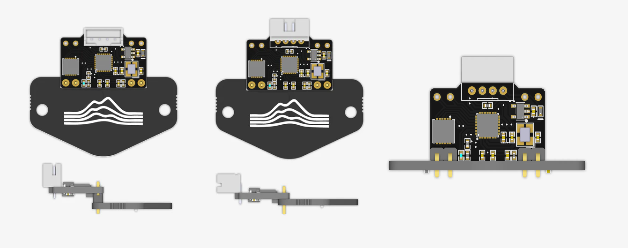 Cartographer V3: Standard, Low Profile and Right Angle
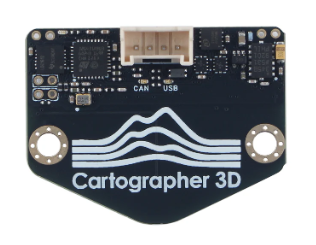 Cartographer V4. The Low Profile V4 has a different connector but the same PCB.
Check from the command line
Section titled “Check from the command line”If the probe is connected over USB, list the serial devices:
ls /dev/serial/by-id/A probe running Cartographer firmware appears as usb-Cartographer_…. If it is sitting in the Katapult bootloader, the MCU name is in the device name: usb-katapult_stm32f042x6_… is a V2 or V3, usb-katapult_stm32g431xx_… is a V4.
Over CAN, the MCU type is reported in Klipper’s klippy.log on the line beginning mcu 'cartographer': got or in the Mainsail or Fluidd machine page under the MCU’s details. The firmware update script also detects the version for you.
Software generation
Section titled “Software generation”Open your printer.cfg and look for the probe’s section. If you have never installed a plugin, you are starting fresh: follow Installation and Setup.
What you see in printer.cfg |
Generation | What to do |
|---|---|---|
[mcu cartographer] followed by [cartographer], installed with the curl … cartographer3d-plugin … install.sh command |
Current plugin (cartographer3d-plugin) |
Use the current pages. The Macro Reference and Configuration Reference describe this plugin. |
[scanner] with sensor: cartographer, commands such as CARTOGRAPHER_TOUCH and PROBE_SWITCH |
Previous plugin (scanner-based, 2024) | Still works, but is no longer developed. Its pages are under Previous Plugins. To upgrade, follow Klipper Setup, which starts with removing [scanner]. |
[cartographer] with serial: inside it, speed:, backlash_comp: and mesh_runs: at the top level, installed by cloning cartographer-klipper |
Original plugin (2023) | Archived. See Classic Installation. This plugin reuses the [cartographer] section name, so check the keys, not just the name. |
The quickest tell between the original and the current plugin: the current plugin puts the connection details in a separate [mcu cartographer] section and has sub-sections such as [cartographer scan] and [cartographer touch]. The original plugin has none of those.
Firmware
Section titled “Firmware”Firmware is matched to the hardware version and to the connection protocol. V2 and V3 share the v2-v3 firmware folder; V4 has its own. Flashing a file built for the wrong hardware will leave the probe unresponsive until it is recovered over DFU. The Firmware overview explains which file is which, and the update script detects your hardware before it flashes anything.