> For the complete documentation index, see [llms.txt](https://docs.cartographer3d.com/llms.txt). Markdown versions of documentation pages are available by appending `.md` to page URLs; this page is available as [Markdown](https://docs.cartographer3d.com/cartographer-probe/firmware.md).
# Firmware
Cartographer Firmware is based off a Klipper fork available [here](https://github.com/Cartographer3D/MCU-Firmware---Based-on-Klipper/), without the amazing work done by the Klipper team, none of this would be possible.
### Cartographer Firmware Versions
Cartographer Firmware is provided as a pre-complied binary, ready for you to flash onto your probe and use it.
#### Which firmware for which device?
Not all firmware is compatible with EVERY device, for example Cartographer V1 used a RP2040, V2 and V3 used a stm32f042 and V4 uses a stm32g431. You need to ensure you use the correct firmware for the right device else you could potentially brick it, at the minimum you would need re-flash via DFU mode.
#### Which file should I use?
In our Firmware repository, there are a lot of different firmware files to choose from, this guide should help you understand which to select.
**Combined Firmwares**
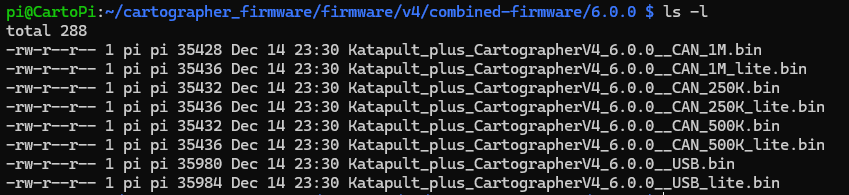
The combined firmware is a pre-compiled version of the Cartographer Firmware with the Katapult Bootloader pre-installed, this is to ONLY BE INSTALLED VIA DFU. You should always install this at the memory location of `0x08000000` if you flash this via Katapult, you will have a bad time and will be required to re-flash your probe.
This is available at `~/cartographer_firmware/firmware/probe_version/combined-firmware`
**Katapult**
This is the Katapult bootloader, it is a bootloader tool that will allow you to update your Cartographer probe without having to gain access to it or put it into DFU mode. This should be flashed at `0x8000000`. You would typically originally flash this via DFU mode, but once it is on your probe it shouldn't need updating.
This is available at `~/cartographer_firmware/firmware/probe_version/katapult`
**Katapult Deployer**
The Katapult deployer is version of Katapult which can be deployed via Katapult and will allow you to switch the operating mode of your probe. i.e. If you are using your probe via USB and want to switch it to CAN, you would use Katapult to deploy the Katapult Deployer for CAN, which would convert the bootloader from USB to CAN, it would also then wipe your original firmware and allow you to deploy your new firmware via your new protocol.
This is available at `~/cartographer_firmware/firmware/probe_version/katapult-deployer`
**Cartographer Firmware**
This is your main Cartographer Firmware, you will need to match this with the protocol you are using i.e. CAN and specific baudrate or USB. You would also need to select if you want a Full or Lite firmware (more information can be found [here](#full-vs-lite-firmwares))
You must also ensure you select the correct firmware for the hardware you have i.e. do not flash V4 firmware to a V3 or vice versa.
This is available at `~/cartographer_firmware/firmware/probe_version/firmware`
#### Full vs Lite Firmwares
We have recently started distributing out a Full and a Lite firmware, these perform pretty much the same, with the exception that lite has a reduced number of samples being sent to your pi in order to reduce load, it is recommended you use lite firmware on devices with a lower powered Linux Host Device, such as the Creality K1 & K2, or a Raspberry Pi Zero 2.
---
# Agent Instructions
This documentation is published with GitBook. GitBook is the documentation platform designed so that both humans and AI agents can read, navigate, and reason over technical content effectively. Learn more at gitbook.com.
## Querying This Documentation
If you need additional information that is not directly available in this page, you can query the documentation by asking a question.
Perform an HTTP GET request on the following URL with the `ask` and `goal` query parameters:
```
GET https://docs.cartographer3d.com/cartographer-probe/firmware.md?ask=&goal=
```
`ask` is the immediate question: it should be specific, self-contained, and written in natural language.
`goal` is what the user is ultimately trying to achieve, the reason they need the answer. Sharing it helps GitBook give you a better, more relevant answer. A goal is most helpful when it describes the outcome the user wants rather than restating the question. For example, with `ask=how do I create an API token`, a goal like `automate deployments from our CI pipeline` lets GitBook tailor the answer to that use case.
The response will contain a direct answer to the question and relevant excerpts and sources from the documentation.
Use this mechanism when the answer is not explicitly present in the current page, you need clarification or additional context, or you want to retrieve related documentation sections.