
Scan vs Touch Modes
Cartographer has two ways of finding the bed. Scan measures the distance to the bed without contact, using the eddy-current coil. Touch lowers the nozzle until it physically contacts the bed and uses the coil to detect the moment of contact.
You do not have to choose one or the other. In a normal setup, touch sets the Z reference once at the start of a print, and scan does everything else.
What each mode is used for
Section titled “What each mode is used for”| Task | Mode | Command |
|---|---|---|
Homing Z with G28 |
Scan | G28 |
| Setting the Z reference before a print | Touch | CARTOGRAPHER_TOUCH_HOME |
| Gantry levelling and Z tilt | Scan | QUAD_GANTRY_LEVEL, Z_TILT_ADJUST |
| Bed mesh | Scan | BED_MESH_CALIBRATE |
| Standard Klipper probing | Scan | PROBE, PROBE_ACCURACY |
Scan is fast and never contacts the bed, so it is used for anything that probes many points. Touch is slower but gives a true nozzle-to-bed zero, so it is used once per print to set the reference that the scanned mesh is built on.
Which commands touch the bed?
Section titled “Which commands touch the bed?”The nozzle will contact the bed only during these commands:
CARTOGRAPHER_TOUCH_HOMECARTOGRAPHER_TOUCH_CALIBRATECARTOGRAPHER_TOUCH_PROBECARTOGRAPHER_TOUCH_ACCURACYCARTOGRAPHER_SCAN_CALIBRATE METHOD=touchCARTOGRAPHER_AXIS_TWIST_COMPENSATION
Every other command, including G28, QUAD_GANTRY_LEVEL, Z_TILT_ADJUST, BED_MESH_CALIBRATE, PROBE and PROBE_ACCURACY, uses scan and does not touch the bed.
Touch requires the nozzle to be at or below 150 °C and the bed to have metal within a few millimetres of the surface. See Touch for details and the Macro Reference for every command and its parameters.
Using scan only
Section titled “Using scan only”If touch does not suit your printer, for example a thick glass bed, you can run scan only. Leave CARTOGRAPHER_TOUCH_HOME out of your PRINT_START, complete scan calibration, and set your Z offset against the scan model as described in Z Offset. Scan calibration is required in either case, because homing and meshing always use the scan model.
How it works
Section titled “How it works”Cartographer is built around an LDC1612 inductance-to-digital converter. The chip drives an oscillating field in the coil, which induces a corresponding field in the metal below it: the spring steel sheet, or the bed itself if it is close enough. The resonant frequency of that system depends on the distance between the coil and the metal. As the coil gets closer, the frequency rises.
Scan calibration (CARTOGRAPHER_SCAN_CALIBRATE and the paper test) builds a model that maps frequency to distance, and records the distance between the scan trigger point and the nozzle tip. From then on, whenever the probe reads a given frequency it knows where the nozzle is.
The complication is that frequency depends on the temperature of the coil and the chip as well as on distance. At the same height, a warmer coil reads a different frequency. Coil temperature calibration measures this effect and corrects the trigger frequency so the trigger height stays constant as the probe warms up. If you use touch to set your Z reference, this correction matters much less, because touch does not depend on absolute frequency.
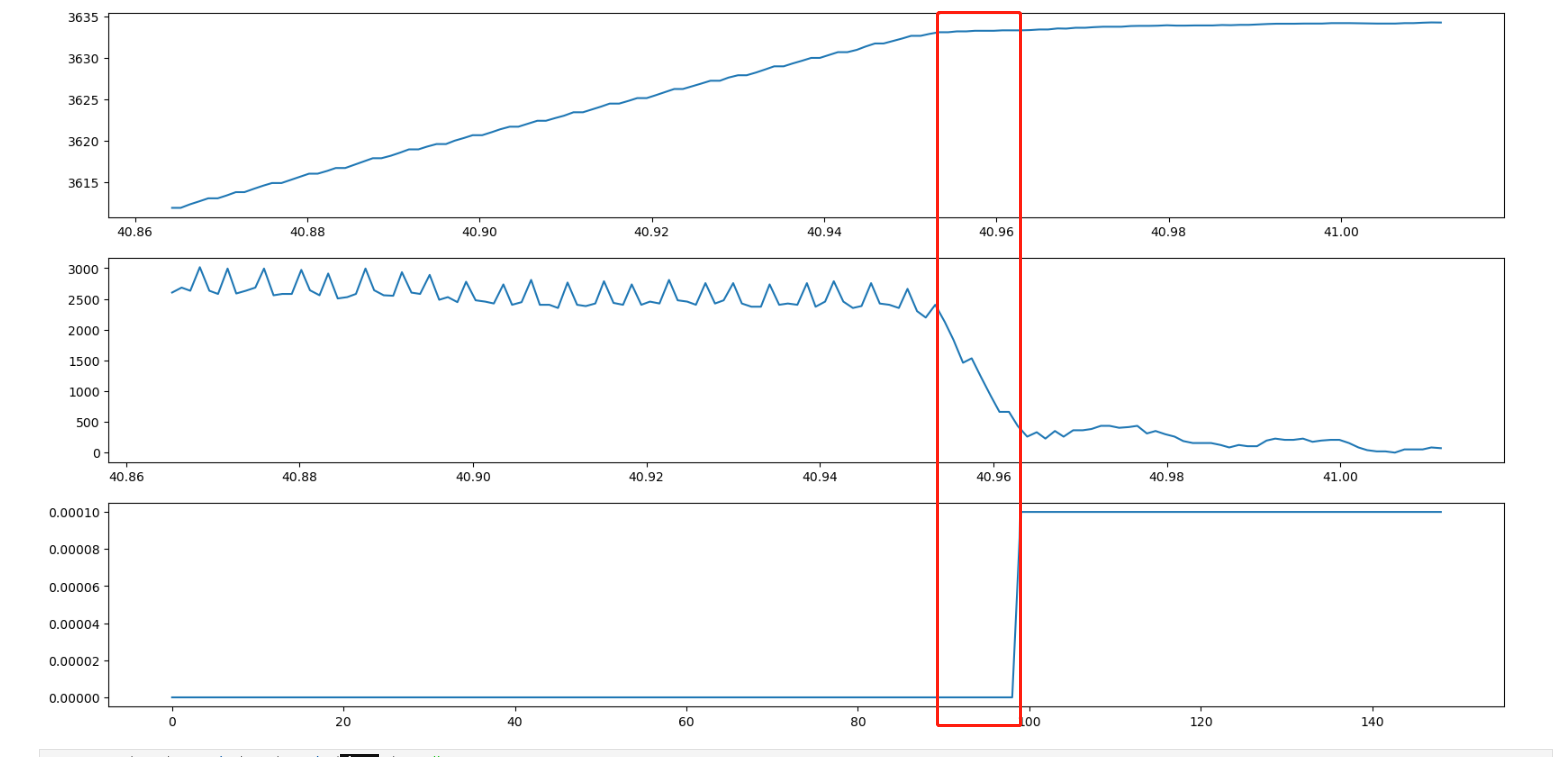
Touch does not care what the absolute frequency is or what height it corresponds to. It watches how the frequency changes as the toolhead descends.
As the probe approaches the bed, the frequency rises at a predictable rate, which appears as a steady slope on a graph. When the nozzle contacts the bed the toolhead stops moving, and the slope flattens out. The plugin detects that change in slope and stops the move. It now knows that the nozzle is exactly at the bed surface, regardless of coil temperature, because it only needed to see the slope change, not a particular frequency value.
Touch still needs the coil to induce a field in something metal, so it requires metal within a few millimetres of the surface. That is why it may not work through thick glass or garolite.
Putting the two together
Section titled “Putting the two together”A typical print start homes Z with scan, which triggers at a calibrated frequency. Gantry levelling and the bed mesh are then scanned relative to that same frequency. At this point the printer knows the shape of the bed but not precisely how far the scan trigger height is from the nozzle tip. CARTOGRAPHER_TOUCH_HOME then touches the bed once and measures that distance directly, and the mesh is applied relative to the true nozzle position.
Because every printer is different, there is usually still a small fixed offset to apply after touch, caused by thermal expansion between touch temperature and print temperature, toolhead or bed flex, and measurement noise. This offset describes the printer as a whole, so it should not change when you swap nozzles or build sheets. Set it as described in Z Offset.